
וורד באוצריא
-
@חנניה
מדובר על קבצים ישנים ככל הנראה.
צריך לחפש במתמחים, שם העלו קוד VBA להמיר את זה למהדורה חדשה.
הערות שולים מוצגות שורה אחרי טקסט המקור. -
- לא נפתח לי ספרים (נוספים) בוורד באוצרא,
מה יכולה להיות הסיבה? - איך מוצגים הערות שוליים של וורד באוצריא?
- לא נפתח לי ספרים (נוספים) בוורד באוצרא,
-
- לא נפתח לי ספרים (נוספים) בוורד באוצרא,
מה יכולה להיות הסיבה? - איך מוצגים הערות שוליים של וורד באוצריא?
@חנניה
מצאתי!
צריך להכניס את זה לוורד לVBA, איך לי כח להסביר בדיוק איך... זה עובד נפלא!Sub ConvertDocToDocx() Dim oDlg As FileDialog Dim sFolder As String Dim sName As String, sFullName As String Dim oDoc As Document Dim i As Integer: i = 0 Application.ScreenUpdating = False Set oDlg = Application.FileDialog(msoFileDialogFolderPicker) If oDlg.Show <> -1 Then Exit Sub sFolder = oDlg.SelectedItems(1) + "\" sName = Dir(sFolder & "*.doc", vbNormal) While sName <> "" If Right(LCase(sName), 3) = "doc" Then i = i + 1 Set oDoc = Documents.Open(FileName:=sFolder & sName, _ ConfirmConversions:=False, ReadOnly:=False, AddToRecentFiles:=False, _ PasswordDocument:="", PasswordTemplate:="", Revert:=False, _ WritePasswordDocument:="", WritePasswordTemplate:="", Format:= _ wdOpenFormatAuto, XMLTransform:="") sFullName = Left(oDoc.FullName, InStrRev(oDoc.FullName, Chr(46))) If ActiveDocument.HasVBProject = True Then ActiveDocument.SaveAs sFullName & "docm", wdFormatXMLDocumentMacroEnabled Else ActiveDocument.SaveAs sFullName & "docx", wdFormatXMLDocument End If ActiveDocument.Close End If sName = Dir() Wend Application.ScreenUpdating = True If i = 1 Then MsgBox i & " document converted" Else MsgBox i & " documents converted" End If Set oDoc = Nothing Set oDlg = Nothing End Sub - לא נפתח לי ספרים (נוספים) בוורד באוצרא,
-
מ מענין לשמוע התייחס לנושא זה
-
@חנניה
מצאתי!
צריך להכניס את זה לוורד לVBA, איך לי כח להסביר בדיוק איך... זה עובד נפלא!Sub ConvertDocToDocx() Dim oDlg As FileDialog Dim sFolder As String Dim sName As String, sFullName As String Dim oDoc As Document Dim i As Integer: i = 0 Application.ScreenUpdating = False Set oDlg = Application.FileDialog(msoFileDialogFolderPicker) If oDlg.Show <> -1 Then Exit Sub sFolder = oDlg.SelectedItems(1) + "\" sName = Dir(sFolder & "*.doc", vbNormal) While sName <> "" If Right(LCase(sName), 3) = "doc" Then i = i + 1 Set oDoc = Documents.Open(FileName:=sFolder & sName, _ ConfirmConversions:=False, ReadOnly:=False, AddToRecentFiles:=False, _ PasswordDocument:="", PasswordTemplate:="", Revert:=False, _ WritePasswordDocument:="", WritePasswordTemplate:="", Format:= _ wdOpenFormatAuto, XMLTransform:="") sFullName = Left(oDoc.FullName, InStrRev(oDoc.FullName, Chr(46))) If ActiveDocument.HasVBProject = True Then ActiveDocument.SaveAs sFullName & "docm", wdFormatXMLDocumentMacroEnabled Else ActiveDocument.SaveAs sFullName & "docx", wdFormatXMLDocument End If ActiveDocument.Close End If sName = Dir() Wend Application.ScreenUpdating = True If i = 1 Then MsgBox i & " document converted" Else MsgBox i & " documents converted" End If Set oDoc = Nothing Set oDlg = Nothing End Sub@מענין-לשמוע כתב בוורד באוצריא:
איך לי כח להסביר בדיוק איך...
כתבתי פעם מדריך על זה.
https://mitmachim.top/post/777737העתקתי עכשיו לכאן
-
@חנניה
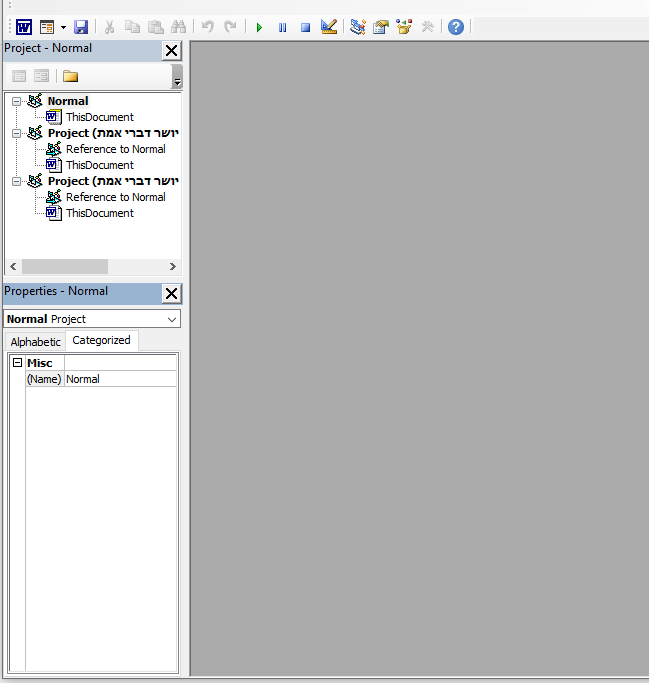
בשורה העליונה אתה צריך ללחוץ על insert, ואז על mudole (מקוה שאני מאיית נכון).
יפתח לך דף לבן ריק, תדביק את הקוד ותסגור את החלון.
בוורד בלשונית תצוגה תלחץ על פקודות מאקרו ותראה שורה שרשום בה באנגלית 'ConvertDocToDocx', תלחץ עליה, יפתח לך חלון בחירת תיקיה, תבחר תיקיה וכל קבצי הdoc בה יתעדכנו לdocs.
אני רק יציין שזה לא משנה את הקובץ אלא יוצר קובץ חדש בתבנית הנכונה, ונשאר גם הקובץ הקודם. -
יש לי תוכנה מהירה שעושה את כל ההמרה כולל תתי תיקיות

 { const baseUrl = "https://www.google.co.il/search?q=site:forum.otzaria.org"; const m = location.pathname.match(/^\/(topic|category)\/(\d+)/); const type = m ? m[1] : null; const id = m ? m[2] : null; let searchInput; function search(path = "") { const query = searchInput.value.trim(); if (query) { window.open(`${baseUrl}${path}%20${encodeURIComponent(query)}`, "_blank"); } } let buttons = {}; buttons.searchAll = { id: "bb-search-all", label: `חיפוש ${type ? "בכל הפורום" : ""}`, className: type ? "btn-secondary" : "btn-primary", callback: () => search(), }; if (type === "topic") { buttons.searchTopic = { label: "חיפוש בנושא זה", className: "btn-primary", callback: () => search(`/topic/${id}`), }; } else if (type === "category") { buttons.searchCategory = { label: "חיפוש בקטגוריה זו", className: "btn-primary", callback: () => search(`/category/${id}`), }; } buttons.cancel = { label: "ביטול", className: "btn-default", "data-bs-dismiss": "modal" }; const dialog = bootbox.dialog({ title: '<div style="display:flex; align-items:center; justify-content:center; gap:15px;"><img src="https://forum.otzaria.org/assets/uploads/system/site-logo.png?v=4921ea700b3" width="60" alt="פורום אוצריא"><span style="font-size:24px; font-weight:bold;">פורום אוצריא</span></div>', message: '<input id="bb-inp" class="bootbox-input bootbox-input-text form-control" placeholder="הקלידו כדי לחפש בגוגל" autocomplete="off"/>', buttons, backdrop: true, show: true, onEscape: true }); dialog.on("shown.bs.modal", function () { searchInput = document.getElementById("bb-inp"); if (searchInput) { searchInput.focus(); searchInput.addEventListener("keydown", function (e) { if (e.key === "Enter") { e.preventDefault(); const query = this.value.trim(); if (query) { search(); dialog.modal("hide"); } } else if (e.key === "Escape") { e.preventDefault(); dialog.modal("hide"); } }); } const searchAllButton = document.getElementById("bb-search-all"); if (searchAllButton) { searchAllButton.title = "לחצו על אנטר כדי לחפש"; } }); })(); void 0;)